





![How to Build Educational 3d Games with AI with Whacka [FREE]](https://hossamudin.com/wp-content/uploads/2026/08/How-to-Build-Educational-3d-Games-with-AI-with-Whacka-FREE-2-915x450.png)

How to Build Educational Games with AI for Free Using Whacka
Teachers already know the hardest part of educational game design: what students struggle with, what makes a topic click, and where practice becomes boring. What has traditionally been missing is the technical path from “I have a lesson idea” to “my students can play it today.”
Whacka AI helps close that gap. It is a no-code AI app builder that turns a plain-language description into a working, hosted web app with data, logic, and a shareable live link. In other words: describe the learning experience you want, then refine and publish it without assembling a development team.

This guide gives you a practical six-step method for building an educational game with AI, plus a reusable prompt template and a worked example: FuncQuest, a 3D math-discovery game.
Live demo: Add the verified FuncQuest URL here before publishing: Try FuncQuest
What Is Whacka AI?
Whacka is a mobile-first AI app builder. You explain the app you want in everyday language, and the platform generates the interface, app logic, data structure, and hosted link—usually within minutes. No traditional coding workflow is required.
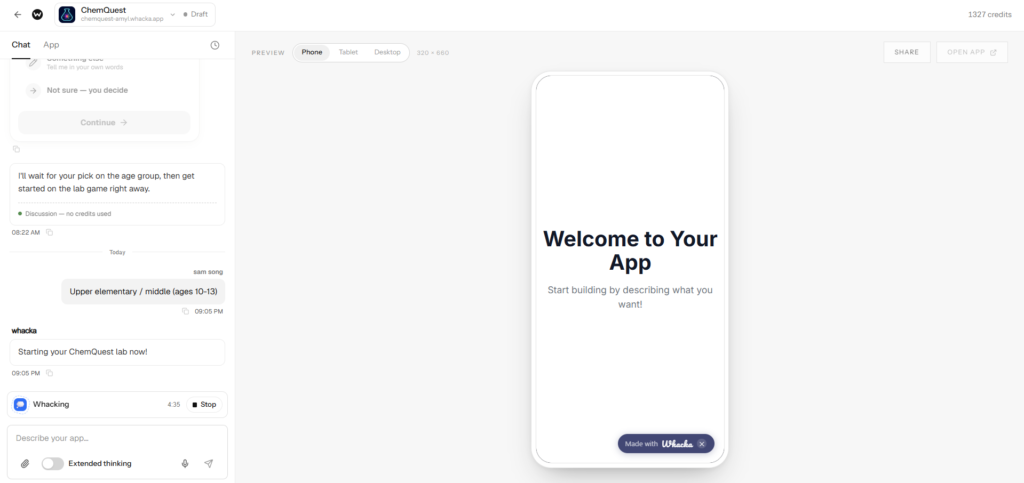
For teachers, that changes the starting point. Instead of asking, “Can I code a game?” you can ask:
- What should students discover?
- What mistake should trigger feedback?
- What would make practice feel like progress rather than another worksheet?
- What should a learner be able to do after five minutes of play?
Whacka is especially useful for focused learning tools: a vocabulary quest, a fractions challenge, an equation explorer, a grammar adventure, or a short revision game tied to one difficult sub-skill.
How Whacka differs from typical no-code tools
Traditional no-code platforms often begin with a blank canvas, database setup, screens, and manual workflow configuration. Whacka’s core workflow begins with natural language: you describe the experience, then iterate through follow-up instructions. It also handles hosting and creates a live link for the app.
Whacka can also support AI features such as chat, image generation, text-to-speech, transcription, voice tools, and sound. These can be useful for language-learning games, narrated instructions, and accessibility features—but use them deliberately, because AI usage has a cost model.
Is Whacka free?
Whacka has a free tier with no card required. At the time of writing, it includes 24 credits per month, delivered as 8 credits per day, and roughly six build rounds; published free-tier apps stay live for 30 days after each publish. Database, storage, push, and authentication are included.
The important distinction is between:
- Build credits: Used when Whacka generates or changes your app.
- AI inside the finished app: Features such as chat, images, or voice can create runtime AI costs for end users unless you choose a plan that sponsors those costs.
So yes, you can start free and build a classroom prototype. But do not promise students “unlimited AI” inside the finished game unless you understand and plan for the relevant runtime costs.
Where Whacka fits
Whacka is one option among tools such as Rosebud, Manus, Gameer, and Eduaide. This article does not claim that Whacka is objectively better than every alternative; the right tool depends on your lesson, devices, school policies, and desired game style.
Whacka’s practical appeal is its prompt-to-live-link workflow: describe a small app, iterate quickly, and share a hosted result. That makes it a sensible option for teachers testing a classroom game idea before investing in a bigger project.
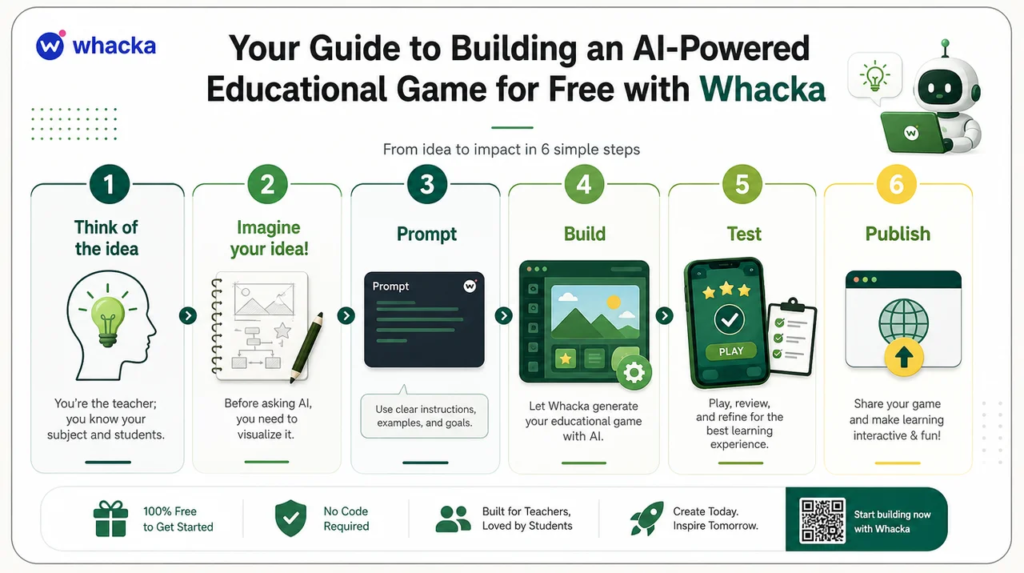
The Six-Step Method to building a game iwth AI (Whacka AI) – Explained
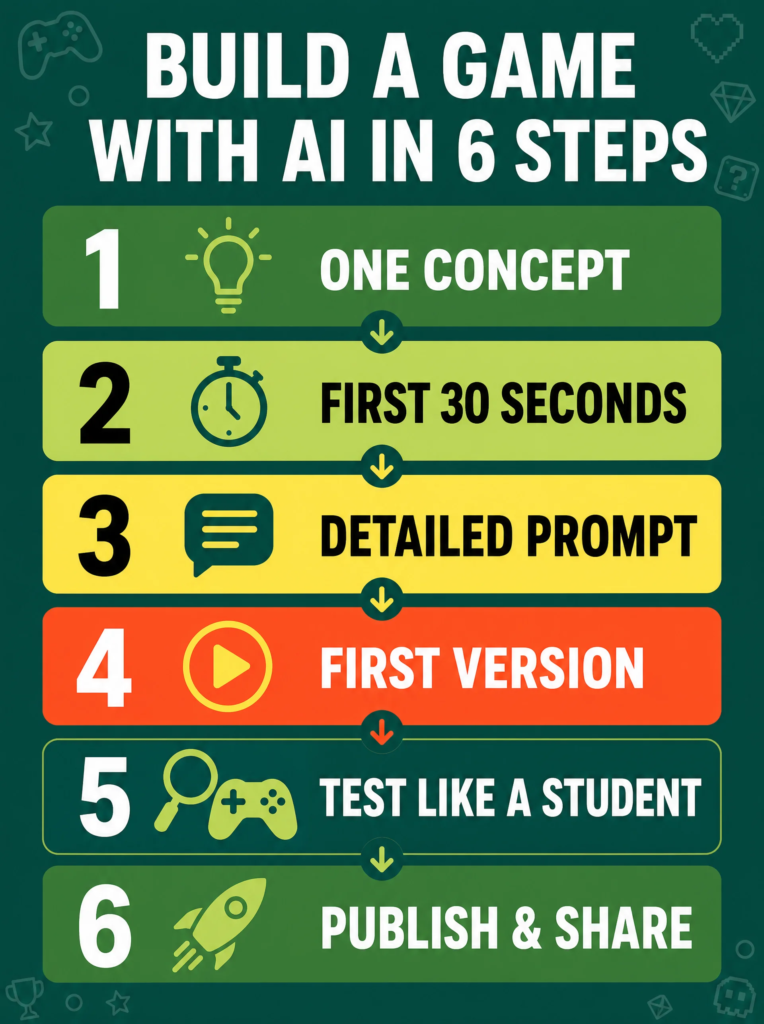
- This infographic shows the key steps and now let’s deep dive into them.
1. Start with one stuck concept
Your unfair advantage as a teacher is not coding. It is knowing precisely where learners get stuck.
Do not begin with “Make a game that teaches math.” That is too broad. Start with one concept that repeatedly causes confusion:
- Understanding inputs and outputs in functions
- Solving one-step equations
- Comparing fractions with unlike denominators
- Matching irregular verbs to past-tense forms
- Distinguishing cause from correlation
- Identifying the parts of a cell
A narrow learning goal creates a clearer game loop. It also makes assessment easier: at the end of the game, you should be able to say exactly what the learner practiced and how they demonstrated progress.
Better goal: “Students will identify whether a relation is a function by checking whether each input has exactly one output.”
Too broad: “Students will understand functions.”
2. Imagine the first 30 seconds
Before writing a prompt, visualize the learner’s opening experience.
Ask yourself:
- Where does the player begin?
- What do they see first?
- What can they touch, move, collect, or inspect?
- What question should they be curious to answer?
- What happens after their first correct or incorrect choice?
AI will amplify the clarity of your mental model. If you ask for “a fun educational game,” you may get generic buttons, random questions, and a theme that does not support learning. If you describe a world, a challenge, a feedback system, and a progression path, you give the AI enough structure to produce something purposeful.
For FuncQuest, the first 30 seconds might look like this:
The student enters a colorful 3D “Function Forest.” Three glowing portals represent different input-output machines. A guide character asks the student to restore power to the forest by identifying which machines behave like functions. The student walks to a portal, sees a visual mapping challenge, chooses an answer, and immediately receives feedback.
That is already more useful than “make a 3D functions game.”
3. Write a detailed prompt
A strong game-building prompt contains four layers:
| Prompt section | Why it matters |
|---|---|
| Content | Defines the educational goal, audience, and lesson material |
| Tech stack | Sets practical boundaries and keeps the app lightweight |
| Architecture | Separates learning content from visual and game logic |
| Instructions | Establishes accessibility, feedback, UX, and game-design rules |
The goal is not to sound technical for its own sake. The goal is to remove ambiguity.
A vague prompt produces vague output. A detailed prompt gives Whacka a clear picture of the learning experience, player behavior, content structure, and non-negotiable quality rules.
4. Build the first version
Paste your prompt into Whacka and let it generate the initial app. Whacka says it creates the interface, data, logic, and live link from your description, rather than requiring you to manually configure a conventional backend.
Treat the result as a first playable prototype, not a final product.
Do not try to solve every issue through one massive follow-up prompt. Instead, refine one category at a time:
- Fix the core learning interaction.
- Improve feedback after answers.
- Add progression and a completion state.
- Improve mobile controls.
- Polish visuals, copy, and audio.
For example, instead of writing, “Fix everything and make it better,” write:
“Keep the current FuncQuest world and content. Improve only the answer-feedback loop: show why each answer is right or wrong, display the student’s current streak, and give a clear next action after feedback.”
Small, focused changes are easier to evaluate and less likely to break something that already works.
5. Test like a student
A game is not finished because it loads. It is finished when a learner can understand it, use it, recover from mistakes, and complete the intended learning journey.
Test it on both major input types:
- Desktop: WASD or arrow movement, mouse drag, clickable objects
- Mobile: On-screen joystick, large touch targets, readable text, no hover-only interactions
Mobile testing is essential because many students will access the game through phones or tablets. Whacka’s app format is designed around sharing and installing web apps on devices, so testing the actual student device experience matters.
Use this quick checklist:
- Does the player understand what to do without teacher help?
- Does every correct answer receive immediate confirmation?
- Does every wrong answer explain the misconception or offer another attempt?
- Does progress persist after refresh or return?
- Are there dead ends, unclickable objects, missing buttons, or confusing menus?
- Can a student finish the experience in the time available?
- Does the game work on a real phone, not only your laptop?
Then give the link to one student, colleague, or family member. Fresh eyes reveal problems that the creator no longer notices.
6. Publish and share
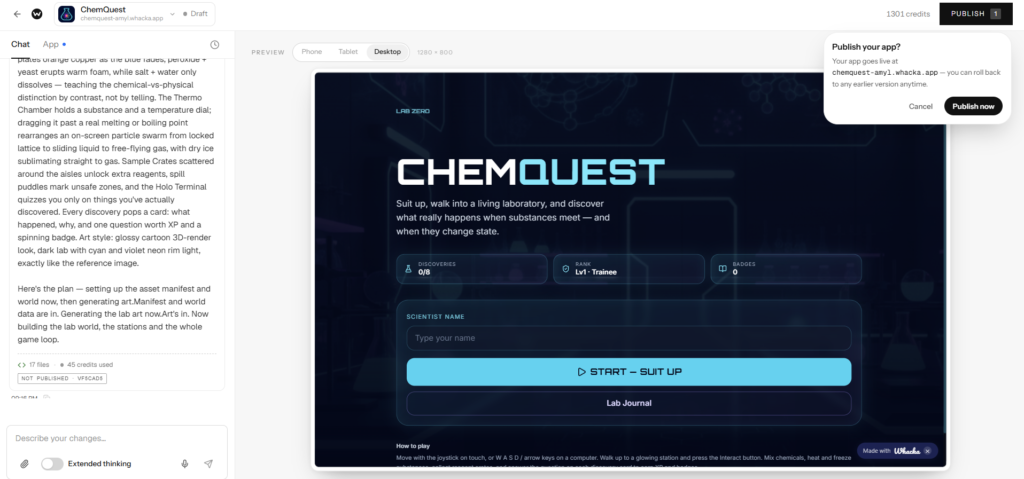
Once the game is stable, publish the latest version and distribute the live link through your usual classroom channels:
- Learning management system
- Class group or messaging platform
- QR code on a classroom slide
- School website or resource hub
- Homework instructions
Whacka’s free plan publishes apps on a whacka.app subdomain, and its platform is built around creating shareable, hosted apps.
For a first release, keep the ask simple: “Play for 10 minutes, complete the three challenges, then tell me which part was confusing.”
Worked Example: FuncQuest
FuncQuest is a 3D educational game concept designed to help students understand functions and equations through exploration rather than a worksheet-first experience.
Instead of opening with definitions, students enter a game world and encounter examples. They inspect input-output machines, identify patterns, answer short challenges, receive immediate feedback, and unlock the next location. The lesson emerges from interaction.
Learning goal
By the end of FuncQuest, students should be able to:
- Explain that a function gives each input exactly one output
- Identify whether a mapping, table, or machine represents a function
- Connect visual input-output examples to equations
- Correct common misconceptions through feedback and retry
Design choices behind the game
- Discovery before definition: Students see and use examples before receiving formal language.
- Immediate feedback: Every answer produces a response, explanation, or retry path.
- Visible progression: A journal, map, score, or unlock system shows the learner’s journey.
- Short challenges: Each interaction teaches or checks one idea rather than overwhelming the player.
- Dual-input play: The game should support desktop and touch users.
Editor note: Insert a verified FuncQuest screenshot here before publication, with descriptive alt text such as: “FuncQuest 3D math game interface showing function portals and student progress journal.”
Example FuncQuest prompt
The following prompt is adapted as a reusable teaching framework for Hossamudin Hassan and can serve as the starting specification for FuncQuest.
Build an interactive 3D playable educational game called “FuncQuest.”

<Content>
Goal:
Help students understand functions and simple equations through exploration,
visual mapping challenges, and immediate feedback.

Subject:
Mathematics — functions, input/output relationships, and introductory equations.

Target audience:
Students aged 11–15. Use simple, encouraging language. Keep reading level
accessible and avoid unnecessary jargon.

Material I would like the student to learn:
- A function gives each input exactly one output.
- Students should identify functions and non-functions from mapping diagrams,
  input-output tables, and visual “machine” examples.
- Students should solve simple one-step equations to unlock progression.
- Include common misconceptions, especially one input leading to multiple outputs.
- Give immediate explanation-based feedback after every answer.

Game world:
Create a colorful 3D “Function Forest” with three landmarks:
1. Input Grove — introduces input and output through simple machines.
2. Mapping Bridge — students inspect relation maps and decide whether they are functions.
3. Equation Cave — students solve one-step equations to restore power.

Player experience:
The player starts with a short visual tutorial. They can walk around, interact
with glowing objects, open discovery cards, answer challenges, earn stars, and
unlock landmarks. Add a journal that records discoveries and a map showing
completed areas.
</Content>

Tech stack preferences:
- Three.js for 3D
- Vanilla ES modules + Three.js from a CDN import map
- DB: localStorage

Notes for architecture:
data.js   ← ALL subject content. Nothing else may contain content.
world.js  ← terrain + props + landmarks (reads data.js for placement)
player.js ← controller (reads world.heightAt for ground/collision)
ui.js     ← discovery card + question generator + journal + map
audio.js  ← speech/sfx
save.js   ← profiles + progress
main.js   ← wiring + game rules

Instructions:
- Game must work on desktop with WASD + mouse drag and on touch devices with
  an on-screen joystick.
- Explain game mechanics clearly before play starts.
- Make the game user-friendly, readable, and appropriate for students.
- Learning should be discovery-based, with immediate feedback after answers.
- Use encouraging language; never shame a learner for a wrong answer.
- Include a progress indicator, collectible stars or badges, and visible unlocks.
- Save student progress locally using localStorage.
- Ask me, the teacher, questions before building if important non-technical
  learning decisions are unclear.
- NO BROKEN WINDOWS: every visible interactive object must have a purpose,
  and no important action should lead to a dead end.
- Apply gamification best practices, but keep learning goals more important
  than points or decoration.
Game Design Principles That Matter
No broken windows
In game design, a “broken window” is any small sign that the experience is unfinished or unreliable: a door that looks interactive but does nothing, a button with no response, a score that does not update, or an object the player cannot reach.
Every dead pixel weakens trust. If a learner clicks a glowing object, it should respond. If a menu item is visible, it should work. If a challenge ends, the next step should be clear.
Discovery over lecture
A game should not simply hide a worksheet behind animated graphics. Let learners encounter the concept in context.
In FuncQuest, a learner can first observe that one input machine sends the same input to two different outputs. Then the game can ask, “Can this be a function?” The definition becomes an answer to a problem the learner has already experienced.
Immediate feedback loops
Students should never be left wondering whether an answer was right or why it was wrong.
Effective feedback is:
- Immediate
- Specific
- Short enough to read during play
- Connected to the learning objective
- Followed by a meaningful next step
For example:
“Not quite. A function can send many different inputs to the same output, but one input cannot point to two different outputs. Try another mapping.”
Progression, journal, and map
Gamification works best when it makes learning progress visible rather than merely adding points.
A simple journal or map can show:
- Concepts discovered
- Challenges completed
- Incorrect-answer patterns to revisit
- Areas still locked
- Stars, badges, or achievements earned
This helps learners feel that they are moving through a journey rather than completing disconnected questions.
Design for both desktop and touch
Do not lock out phone-only students by designing only for keyboard and mouse.
Every important action should work with:
- Keyboard movement and mouse drag on desktop
- Touch controls and large buttons on mobile
- Clear labels rather than icon-only navigation
- Text that remains readable on smaller screens
Reusable AI Educational Game Prompt Template
Copy this prompt, replace the content section with your own lesson, and keep most of the architecture and instruction blocks intact.
Build an interactive 3D playable game for kids (Fortnite/GTA V) style.

<Content>
Goal:
Subject:
Target audience:
Material I would like the student to learn:
</Content>

Tech stack preferences:
- Three.js for 3D — Vanilla ES modules + Three.js from a CDN import map
- DB: localStorage

Notes for architecture:
data.js   ← ALL subject content. Nothing else may contain content.
world.js  ← terrain + props + landmarks (reads data.js for placement)
player.js ← controller (reads world.heightAt for ground/collision)
ui.js     ← discovery card + question generator + journal + map
audio.js  ← speech/sfx
save.js   ← profiles + progress
main.js   ← wiring + game rules

Instructions:
- Game should work on desktop (WASD + mouse drag) AND touch
  (on-screen joystick). Explain game mechanics to the user.
- User-friendly game.
- Learning should be discovery-based with feedback.
- Ask me (the teacher) anything before starting to clarify non-technical decisions.
- NO BROKEN WINDOWS — apply best game design practices.
- Apply gamification best practices.
The most important change you make is not the technology section. It is the content section. Define one learning goal, one audience, and a small set of teachable interactions.
Common Pitfalls and Fast Fixes
| Pitfall | What happens | Better approach |
|---|---|---|
| “Teach math” as the goal | The game becomes generic and unfocused | Name one sub-skill, such as identifying functions |
| Skipping visualization | The world feels random or decorative | Describe the learner’s first 30 seconds before prompting |
| Too many concepts in one game | Students receive shallow practice | Build one focused game, then create a sequel or new level |
| One giant revision prompt | New changes may break existing features | Make small, testable refinement requests |
| Ignoring mobile testing | Phone users encounter poor controls or tiny buttons | Test every release on a real phone and desktop |
| Feedback only says “wrong” | Learners repeat misconceptions | Explain the rule, then let the learner retry |
| Decorative but inactive objects | The world feels broken | Ensure every interactive-looking element has a clear response |
Build Your First Game today with Whacka: https://epreneurs.link/WhackaApp
You do not need to become a developer before you can design a meaningful educational game. Start with what you already know: the concept students find difficult, the misconception they repeat, and the moment you want them to experience.
Use the six-step method:
- Choose one stuck concept.
- Visualize the first 30 seconds.
- Write a detailed prompt.
- Build a small first version.
- Test it with real learners on real devices.
- Publish, share, and improve.
Whacka’s free tier is enough to explore this workflow and publish an initial prototype, while its paid plans provide additional build credits and longer-term publishing options. Verify the current pricing and limits before planning a larger deployment. whacka
Call to action: Try the FuncQuest demo, then use the prompt template above to turn one of your own lessons into a playable game with Whacka.
Affiliate & Sponsorship Disclaimer
This article/video contains an affiliate link. If you sign up through it, we may earn a commission or other benefit at no extra cost to you. This content is also sponsored by Whacka. All opinions and the teaching method described remain our own.
